Frequently asked questions
Please read this page carefully before you contact the author.
Please send questions about Tera Term Mac to the Tera Term Mac Issues.
[About Tera Term Mac]
Q. Where can I find the latest version?
A. You can find the latest Tera Term Mac at:
https://github.com/teraterm-mac/teraterm-mac/releases/latest
A. An installed Tera Term Mac supports automatic updates (Sparkle). You can check at any time with [Tera Term Mac] > [Check for Updates...] in the menu.
Q. When will the next version be released?
A. Tera Term Mac has no fixed release schedule. When a new version is available, the automatic update asks whether to install it (it never replaces the app without asking).
A. The changes in each version are listed on Releases.
Q. What is the version number of Tera Term Mac?
A. Tera Term Mac has its own version numbers (for example 0.4.4).
You can see the version in [Tera Term Mac] > [About Tera Term Mac].
Q. Can a user use Tera Term Mac's program and source code at the user's place of business for commercial purposes?
A.
No problem. You do not need to tell us. Tera Term Mac is distributed under the MIT License (the parts derived from Tera Term are under the BSD License).
Q. I want to participate in Tera Term Mac development.
A. Please send issues or pull requests to teraterm-mac/teraterm-mac on GitHub.
Q. EAR (Export Administration Regulations)
A.
Tera Term Mac does not include SSH cryptography; it uses the ssh command that comes with macOS for SSH. Refer to the components and license and copyright pages; you are responsible for your own compliance with export laws.
[Basic usage]
Q. I can not connect to a host.
A. Please check the following things:
- Network configuration of your Mac. See "Network" in System Settings (System Preferences).
- Can you use other network applications such as WWW browsers and ftp
- clients?
- Is the host name or IP address correct?
- Can you connect to the host from other machines?
Please read message and confirm following:
- Invalid host
-
Connection destination was not resolved from host name.
Confirm that host name is valid and host name is able to resolve. - Connection refused
-
Connection destination does not up a service.
Confirm service status. - Connection timed out
-
No response from destination.
Check network, host startup, firefall, etc. - Network cannot be reached
-
Unable to reach destination.
Check network settings of the Mac on which Tera Term Mac is running, or route to destination.
Please ask the network administrator how to configure network properties.
Q. Tera Term automatically closes when I logout a telnet host. How to disable closing?
A. Turn "Auto window close" off in the [Setup] Additional settings "TCP/IP" tab.
Q. I want to connect to a telnet host, but a serial port is always opened when Tera Term is started.
A. Set "Default port" to "TCP/IP" in the [Setup] Additional settings "TCP/IP" tab.
Q. I changed setup item, but it is not kept. Exit Tera Term and start Tera Term, changed setup item value is restored to original value.
A. In Tera Term Mac, settings you confirm with OK in the [Setup] menu dialogs are saved automatically and used the next time you start the app.
[Setup] Save setup writes the settings to a file in the TERATERM.INI format. You can read such a file with [Setup] Restore setup.
[Keyboard]
Q. How to set the Backspace or Delete key to work for the backspace function.
A. The Mac delete key sends DEL by default, like Terminal.app. To send Backspace (BS) instead, turn "Backspace key" on or off in the [Setup] Keyboard dialog box. For the forward delete (fn+delete) key, turn "Delete key" on (this may not work in some hosts).
Q. How to use numeric keys in normal way?
Q. I can not enter "/", "*", "-" and "+" by using the numeric keypad.
A. See "Numeric keypad".
Q. How to use F1-F4 keys as VT100 PF1-PF4 keys?
A. See "PF1-PF4 keys of VT100".
Q. F1 (or whatever) key does not work. How to configure the keyboard?
A. In most cases, I can not answer this kind of question because I don't know how the key works. If you know what character (string) should be sent or what function should be performed by pressing the key, you can make the key work by editing the keyboard setup file. Read Keyboard setup file.
Q. How to use the same keyboard shortcut for the [Edit] Paste (Copy) command as other applications?
A. In Tera Term Mac, ⌘V (⌘C) is the shortcut for [Edit] > [Paste] ([Copy]), the same as other Mac applications.
Control+V and Control+C are sent to the host as ^V and ^C.
[SSH]
Q. I can not paste into a password or passphrase input box.
A. In Tera Term Mac, you can paste into dialog input boxes with ⌘V.
SSH authentication is done by macOS OpenSSH (the ssh command). You can also paste with ⌘V when it asks for a password in the terminal.
Q. I sent a file by SCP without specifying destination folder, but file was not saved to shell current directory.
A. SCP can not save to shell current directory.
Terminal emulator does not know shell current directory of remote side. If prompt indicate current directory, a text from remote side is only displaying. Current directory is not shown always, in some shell or setting. User is able to understand current directory because he construct in his head from prompt text, result of `cmd' command or result of `cd' command.
[Miscellaneous]
Q. DEC Special Graphics (like Box-drawing characters) are not displayed properly.
A. Refer to DEC Special Graphics
The app draws box-drawing characters by itself.
If they are not displayed properly, check that the character code settings of the host and Tera Term Mac match.
Q. When Box-drawing characters in DEC Special Graphics are displayed, a "line" character does not match with an "angle" character smoothly.
A. Refer to DEC Special Graphics
Tera Term Mac draws the main box-drawing characters (such as ─ │ ┌ ┐ └ ┘ ├ ┤ ┬ ┴ ┼) as lines filling the whole character cell, so gaps rarely appear. If you still see them, try changing the font, its size or the character spacing in [Setup] Font.
Q. Why number of fonts in the list of [Setup] Font dialog box is so small?
Q. Why I can not select the "Times" font at the [Setup] Font dialog box?
A. In Tera Term Mac, you choose the font in the macOS Fonts panel. Characters must be displayed with equal spacing to emulate the VT terminal properly, so choose a fixed-pitch font such as "Menlo", "SF Mono" or "Courier".
If you choose a proportional font such as "Times", the characters are not evenly spaced and are not displayed properly.
Q. How to change the behavior of text selection by mouse double clicking?
A. See "Delimiters of a word selected by double clicking".
Q. The window title can not change by using the /W= of the command line option and the settitle macro command.
A. Some Linux distributions overwrite the window title after the current users' changing. To prevent this behavior, try either one of the following two methods:
- A user configures the user's shell settings to disable sending the control sequence for the window title changing.
- A user turns off the "Accept Window Title Change Request" on the General tab of the [Setup]Additional Setting "General" tab.
Q. Window content is cleared when window is resized.
A. To prevent this behavior, turn off [Setup]-[Additional settings]-[General]-[Clear display when window resized].
Q. Content of log file is not same as displayed in VTWindow. Character that is not able to displayed is outputted.
A. VTWindow displays result of received data which is parsed by control sequence. On the other hand, log file is a record of received data.
Therefore "content of log file" is not become same as "displayed content in VTWindow." It is similar to the difference between opening a Word document in Word and opening it in a text editor.
type `s'
type ENTER
256colors2.pl ansi.sh bcetest.sh color-sgr-decscnm.pl colortable16.sh data
%
256colors2.pl ansi.sh bcetest.sh color-sgr-decscnm.pl colortable16.sh data
%
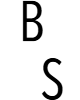 ls
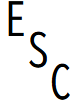 [?2004l[0m[01;32m256colors2.pl[0m [01;32mansi.sh[0m [01;32mbcetest.sh[0m [01;32mcolor-sgr-decscnm.pl[0m [01;32mcolortable16.sh[0m [01;34mdata[0m[0m[27m[24m[J% [K[?2004h
If you are using Bash, you can reduce redraws and help prevent log corruption by disabling the line-editing as follows.
Instead, you will no longer be able to use key cursor operations.
set +o vi
Q. I selected a range, but it isn't highlighted. The color doesn't change.
A.
In the Window, select "Reverse" for Attribute and click the "Swap colors" button.
This occurs because the Normal attribute and Reverse attribute have the same color settings. When text with the Normal attribute is selected, the colors of the Reverse attribute are applied.
The "Swap colors" button swaps the text and background colors of only the currently active character attribute. If you swap the Normal attribute colors, the Reverse attribute colors remain unchanged.
[Migrating from Windows Tera Term]
Q. Can I use the configuration file (TERATERM.INI) of Tera Term for Windows?
A.
You can read a Windows TERATERM.INI with [Setup] Restore setup.
Terminal size, character codes, new-line codes, colors, font, serial settings, the host history and more are applied.
Both UTF-16 (Tera Term 5) and Shift_JIS etc. (Tera Term 4) files can be read.
Settings that do not apply to the Mac as they are, such as fonts not on the Mac or Windows folder paths, are not applied.
TeraTerm Menu entries can be read from ttpmenu.ini with "ttpmenu.ini" > "Import…" in the list settings.
For details, see Migrating from Windows Tera Term.