Additional settings / "Font" tab ([Setup] menu)
- VTWindow Font
-
Specify VTWin font. The current font name and size are shown.
- Select Button
-
Opens the macOS Fonts panel to choose the font and size.
The chosen font is applied to the terminal immediately. - Reset to Default Font button
- Restores the default font and size of Tera Term Mac. The button is hidden while the default font is used.
- Open font settings / Fonts folder button
- Opens your Fonts folder (~/Library/Fonts) in Finder. You can also use the macOS Font Book app to add and manage fonts.
- Drawing resized font to fit cell width
-
The character width used by Tera Term to render text may not match the character width defined by the font design.
When the text is drawn to fit the cell width, looks natural, but drawing may be slower and the font design may differ from the font developer's intent.
- ON
- When the width to be displayed and the width of the font to be drawn are different, text is drawn with resizing font to the cell width.
- OFF
-
Displays the design of the font file as it is.
- When Tera Term displays as 2Cell and the font design is 1Cell, 1Cell character and 1Cell space are drawn.
- When Tera Term displays as 1Cell and the font design is 2Cell, The left half of 2Cell is drawn.
- character space
-
When charactor space is 0, font outline and cell outline are identical.
Setting character spacing allows to add (or remove) space around font outline.
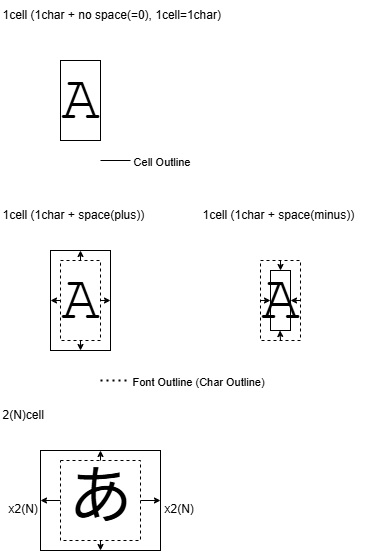
Type values in the top, bottom, left and right fields, or change them with the arrow buttons. When the values differ from the defaults, the "Reset to Default" button restores them.

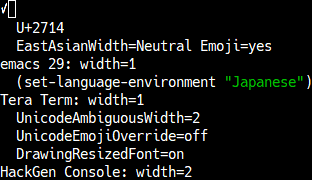


Note:
- DEC Special Graphics are drawn without a special font, using characters of the same shape, one cell wide.