Connect to a serial device
Use this to reach the console of a router, a switch or a microcontroller board. Macs have no RS-232C port, so use a USB-to-serial adapter cable.
Preparation
- Plug the USB serial cable into your Mac.
- Some cables need a driver from the maker (see the cable's manual).
- Connect the other end to the console port of the device.
Steps
- Press ⌘N ([File] > [New connection...]).
- Choose "Serial".
- In "Port", choose the cable's port. USB serial ports have names like "/dev/cu.usbserial-…" or "/dev/cu.usbmodem…".
- Set "Speed" to match the device. 9600 and 115200 are common (see the device's manual).
- Data, parity, stop bits and flow control are usually fine at 8, none, 1, none.
- Click "Connect".
- If nothing appears, press return once.
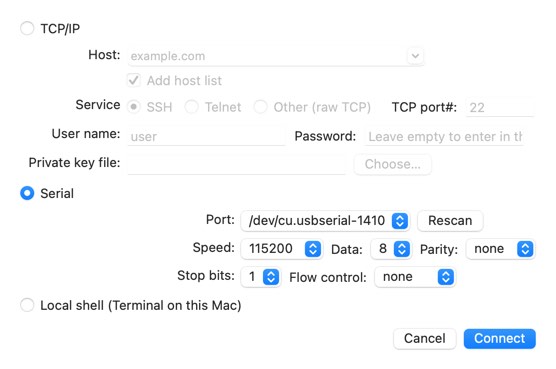
Serial selected, with a port and a speed of 115200. The port name is an example
If the port list shows "(No serial ports found)", unplug and replug the cable, then click "Rescan". If it still does not appear, check that the driver is installed.
Change the speed later
To change the speed and other settings while connected, choose [Setup] > [Serial port...].
More details
Quick guide contents | Next: Terminal basics