Record a log
You can save what appears on the screen to a file (a log). It is handy as a record of your work or to look back at later.
Start logging
- In the window you want to record, choose [File] > [Log...].
- "Filename" already holds a file name. To change it, click the "..." button and choose a place and name.
- If the file already exists, choose "Append" (add to the end) or "New / Overwrite".
- Check "Include screen buffer" to also record what is on the screen now.
- Click "OK" to start logging.
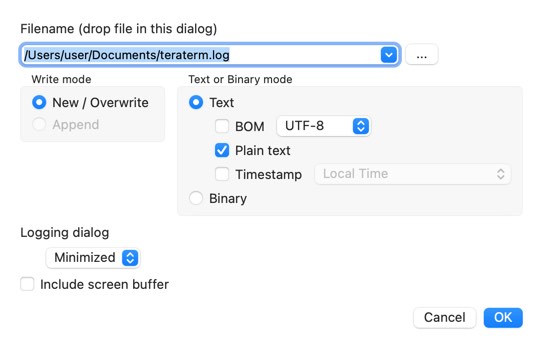
The [File] > [Log...] dialog (the file name is an example)
Stop and view the log
- To stop, choose [File] > [Stop Logging].
- To stop for a while, choose [Pause Logging].
- To read the log, choose [View Log].
More details
- Log (time stamps, dates in file names)
- How to record and replay logs
- Stop Logging