Save the hosts you use often (TeraTerm Menu)
Save the servers you connect to often, and you can connect just by picking one from a list. The same feature as TeraTerm Menu on Windows is built into Tera Term Mac.
Open the list editor
- It opens when you start Tera Term Mac.
- To open it later, choose [Tera Term Mac] > [Edit TeraTerm Menu List…].
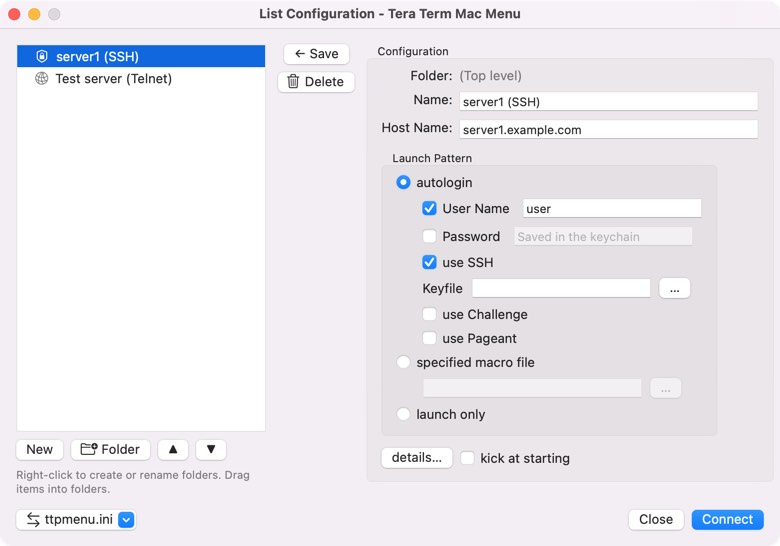
The list editor: saved hosts on the left, the settings of the selected host on the right (example hosts)
Add a host
- Click "New" at the bottom left.
- Type an easy-to-recognize name in "Name" on the right (for example server1 (SSH)).
- Type the host in "Host Name" (for example server1.example.com). To use another port, write "host:port".
- Leave the launch type at "autologin".
- Check "User Name" and type the user name.
- For SSH, check "use SSH".
- To remember the password too, check "Password" and type it. The password is stored safely in the macOS keychain.
- Click "← Save" to add it to the list on the left.
Connect to a saved host
- Select it in the list editor and click "Connect" at the bottom right.
- Click the Tera Term Mac icon on the right side of the menu bar at the top of the screen to see the list. Pick a host to connect right away.
- Right-clicking the Tera Term Mac icon in the Dock shows the list too.
Handy tips
- Right-click the list to create folders, and drag hosts into them.
- Check "kick at starting" to connect automatically when Tera Term Mac starts.
- A ttpmenu.ini from Windows can be imported with the "ttpmenu.ini" button at the bottom left.
More details
Quick guide contents | Next: Try a macro